Telegram Link Opened Before You Sent It? Disable Previews and Check Your Click Counts
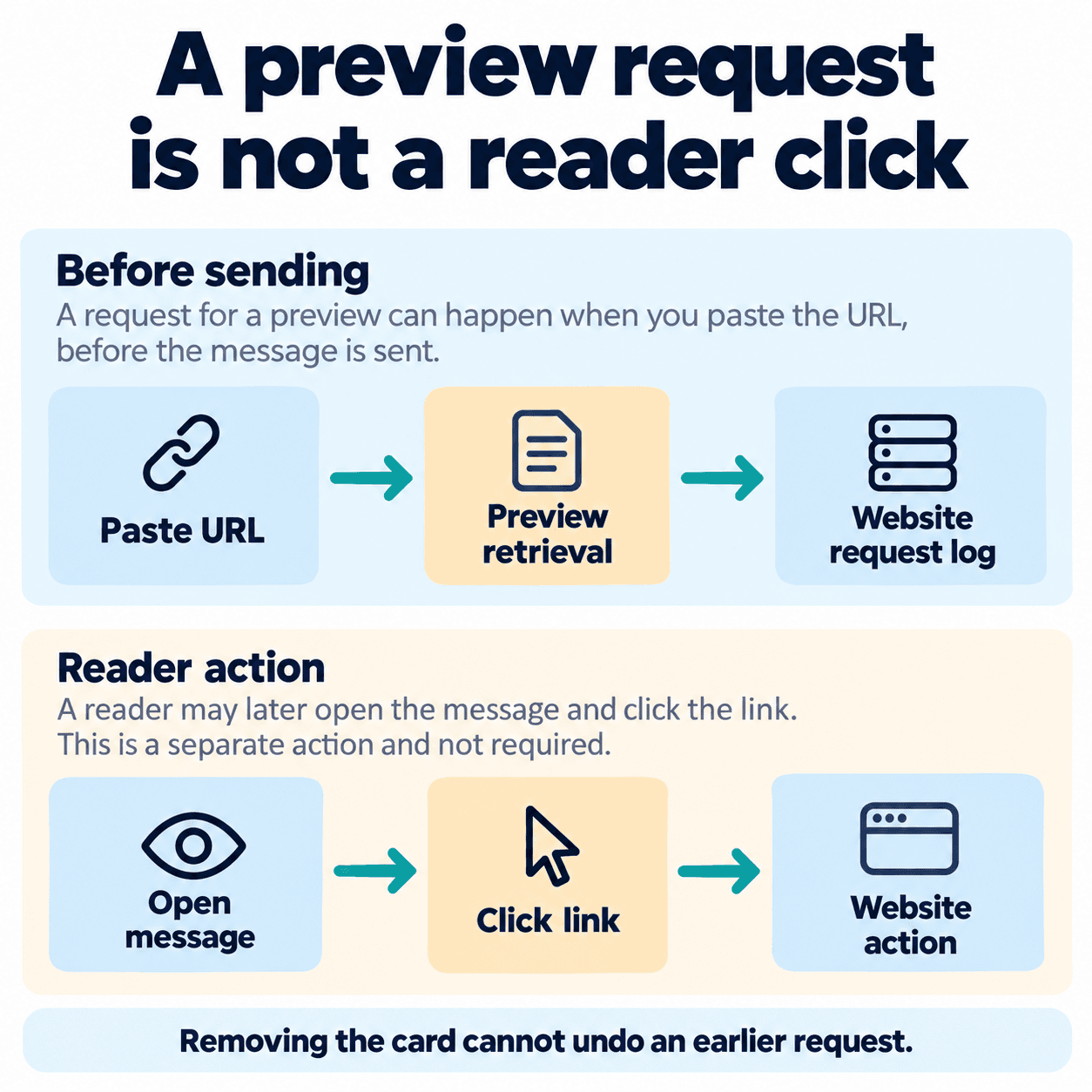
A campaign URL receives a request while your Telegram message is still in the composer. Has a customer already opened it? A preview can explain that early traffic: Telegram documents that pasting a URL starts link analysis and preview retrieval before Send.
Remove the preview card for a message you want to send without one, or configure the bot request before sending. Removing a card cannot undo a request your server already received. Check the destination's rules separately if the URL grants one-time access.
1. Why a URL can receive a request before Send
Preview retrieval, sending the message and a reader opening the destination are separate events. An early GET in a server log establishes that the address was requested. It does not establish a customer visit, a unique person or a completed purchase.
PSYKE's October 23 observation recorded two automatic requests before the user's send reports and one browser request corresponding to a reported manual opening. No additional requests appeared during the respective 121-second and 129-second windows after those send reports.
This was a small observation with user-reported action timings, without independent screen verification. It included no fresh-URL control with previews disabled from the beginning. The result proves neither a cache lifetime nor universal absence of later requests. Recorded User-Agent and ASN values cannot establish requester identity.
2. Remove the preview in Telegram
Paste a harmless test URL into the composer. When its preview card appears, tap the X or close control to remove it, then check the draft before sending. Telegram's official introduction describes this X action; its position and appearance can vary by current client.
If you keep a preview, Telegram also supports choosing its media size, position above or below the message, and which link to preview when several are present. Those presentation choices do not reverse earlier retrieval. Use a disposable test address rather than a customer's limited-use link when inspecting the controls.
3. Disable a bot message preview with JSON
For sendMessage, set link_preview_options.is_disabled to true in the outgoing request. This complete illustrative JSON body uses a placeholder chat_id; replace it with the actual permitted test chat identifier before making the request.
{"chat_id": "<TEST_CHAT_ID>", "text": "Workshop details: https://example.com/workshop", "link_preview_options": {"is_disabled": true}}
Apply the option before sending, rather than changing the URL path to something called no-preview. A path name is not a Telegram setting. Inspect the final serialized request when a bot builder wraps the API. For matching the destination to each message variant, follow Telegram bot broadcast personalization alongside this preview check.
4. Check body, button and preview URLs separately
A message may display one URL, offer a button opening another and select a third for its preview. Changing one field does not automatically update the others. When previews are enabled, link_preview_options.url selects the preview destination; if empty, Telegram uses the first URL in the message text.
For example, show workshop information in the body and send the reservation button to your booking page. Verify both destinations in the actual message. The Telegram bot button and group invite guide explains URL buttons when the destination is a community invitation. Do not assume that a button URL alone guarantees either presence or absence of a preview card.
| Control | Illustrative destination or setting | Check |
|---|---|---|
| text URL | https://example.com/workshop | Visible body destination |
| inline_keyboard button url | https://example.com/reserve | Destination opened by the button |
| link_preview_options.url | https://example.com/workshop | Selected preview destination when enabled |
| link_preview_options.is_disabled | true | Preview disabled for this message |
5. Repeat the test with a harmless unique URL
Use a page you control and a test conversation. Assign a fresh, non-sensitive URL to each condition and record the client version, preview setting and observation window. Keep action timestamps and server logs in the same time zone. The following checklist is a proposed test, not additional observed results.
Compare default and disabled bot requests using different fresh URLs, with the option applied before sending. Record native card removal separately. Reusing an address can mix earlier retrieval or caching into the comparison; a quiet interval alone cannot establish why no request appeared.
- Confirm the new URL has no baseline requests.
- Paste it, record the time and inspect the log before sending.
- Record card removal, send time and the end of the observation window.
- Open it manually and compare the browser visit with server traffic.
- Perform the example CTA and verify the separate server confirmation.
6. Keep preview requests out of conversion claims
Report server requests, instrumented page views, CTA interactions and confirmed business actions separately. A page-view tag depends on its execution conditions; a CTA event records the configured interaction. Count a reservation or redemption only after the destination confirms that business result. Campaign parameters help attribution but do not authenticate a person.
A one-time token could be consumed by preview retrieval if its destination treats the first GET as use. The observation above did not test token consumption. For an illustrative implementation you control, choose a read-only landing page and a separate explicit consume action with server validation. That is an application design choice, not a built-in Telegram feature or proof that every submission is human.
PSYKE's Telegram checking services address a separate preparation task: checking registration and activity for your own phone-number list. Configure preview behavior, link destinations and conversion records in your messaging and website systems.
Frequently asked questions
Does closing the preview cancel a request that already reached my server?
No. Removing the card changes the message presentation. Preserve the earlier request in your records and compare its time with sending and manual opening.
Will every one-time link be consumed by a Telegram preview?
No universal rule applies. Check whether the destination consumes access on the first GET or requires another confirmed action. PSYKE's small observation did not establish token consumption.