Set Up a Paid Telegram Channel: Stars Invites, Renewals and Cancellation
A reader asks to join your paid channel, then asks a harder question: “If I leave next week, will I still be charged?” Your launch copy needs to answer that before the invitation goes into a newsletter. A payment button cannot repair an unclear membership promise.
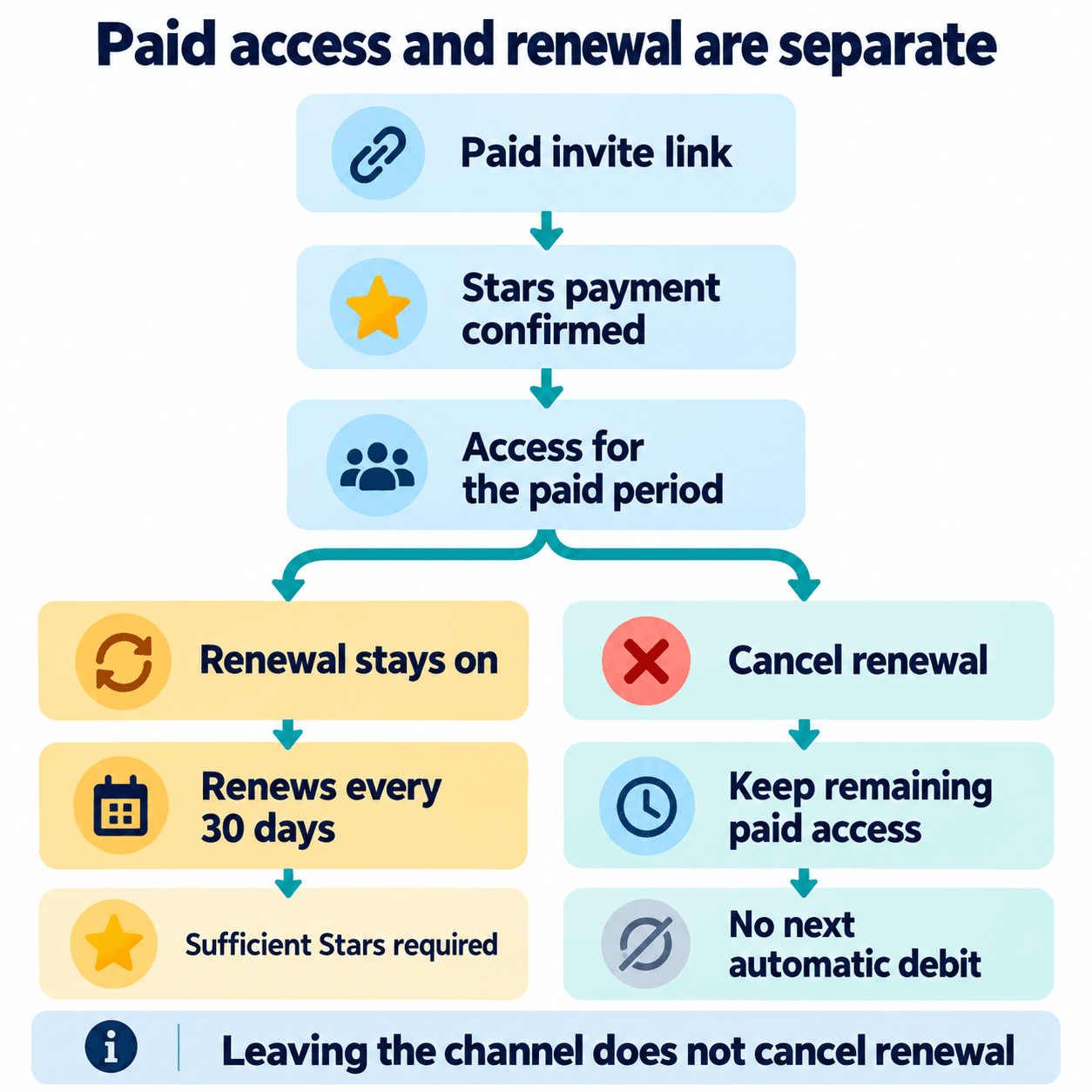
Native paid channel invitations use Telegram Stars. Leaving the channel does not cancel renewal; canceling renewal stops future automatic debits while retaining access for the remaining paid period. Start with a small offer you can maintain, check the invitation as a prospective subscriber, and prepare support wording that distinguishes access from renewal.
1. Choose native paid channel membership
Native paid invitations sell entry to a private channel. Paid media unlocks particular content; a bot invoice purchases the bot’s offer; paid direct messages charge for messaging. Choose the feature that matches what the customer receives.
For an original operating example, imagine a fictional photography publisher selling a continuing field-notes channel. Its offer is one annotated assignment each week and a searchable reference index. It should say whether personal feedback is included, who writes the material, and where billing questions belong. These are editorial decisions to settle before choosing a price.
If your actual need is a free discussion community with moderator approval, use the private group onboarding guide. Charging for a channel is a different admission journey.
2. Create the paid invitation in channel settings
Telegram’s published route is Channel Settings → Channel Type → Manage Invite Links → Create a New Link → Require Monthly Fee. Use a private channel; wording and placement can vary by client. Set the Star amount and create the invitation.
Give the invitation an administrative name that your team understands, such as “Field notes launch newsletter.” Record the channel, intended placement, offer description, responsible editor and date checked. Copy the generated link into a draft campaign first. Ask a second person to compare the destination with the offer; a plausible channel name alone is an easy mistake to miss.
Keep the campaign promise aligned with your Telegram marketing plan. Decide what free material explains the paid offer and what continuing material rewards membership. A paid invitation is an entry mechanism, while your publishing routine gives readers a reason to stay.
3. Write the price and renewal explanation together
The current renewal interval is exactly 30 days, despite the Monthly Fee label. Subscribers see the specific Star amount and recurring terms before confirming. Do not describe this as a charge on the same calendar date each month.
Hypothetical offer copy, with a fictional price: “Join Field Notes for 100 Stars per 30-day period. Receive a new annotated photography assignment each week and the reference index. Review Telegram’s payment confirmation before subscribing.” The 100-Star amount is an illustration, not a PSYKE price, recommendation or claimed preset.
Put the offer beside the invitation wherever you distribute it. Include a working support contact and a sample of the editorial quality. Avoid a headline that promises personal coaching when the actual product is a broadcast channel. Use the channel content planning guide to turn your promise into an achievable publication schedule.
4. Separate leaving from canceling renewal
Leaving does not cancel renewal. Cancellation stops future automatic debits; access lasts through the remaining paid period. Renewal can be restored. Telegram’s subscription documentation describes these states; the cancellation controls should be checked in the subscriber’s current client.
Use two questions when handling a support request: “Can you access the channel?” and “Do you want the subscription to renew?” Record the answers separately. Someone who wants fewer notifications may need help finding the material; someone who wants to stop future charges needs a clear explanation of their subscription state. Do not infer one intention from the other.
| Subscriber state | Current access | Future renewal |
|---|---|---|
| Joined, renewal active | Within paid period | Automatic renewal enabled |
| Left, renewal active | Can rejoin within paid period | Leaving alone does not stop it |
| Canceled, paid time remains | Remaining paid access | Automatic renewal disabled |
| Insufficient Stars near renewal | Check period end | Balance needs attention |
5. Prepare rejoining and low-balance support
A subscriber who left can rejoin during remaining paid time without another payment. Insufficient Stars can prevent renewal; check the subscription state, period end and balance instead of assuming the invitation is broken.
Prepare a short support checklist: the channel involved, what the person is trying to do, the visible status, and whether the paid period has ended. Ask for only the information needed to understand the problem. Never request a login code or account password. If a screenshot is necessary, tell the person to conceal unrelated transactions and personal details.
Keep an editorial handover note too. A subscriber returning after a break should find the current assignment and reference index quickly. A concise starting post helps support answer an access question without making the customer search through weeks of updates.
6. Check the invitation before promotion
Open the exact campaign link from a prospective subscriber account and inspect the channel identity, Star amount and recurring wording. This read-only review can stop before payment. It does not demonstrate a successful purchase, renewal or cancellation, and this guide does not claim a completed test payment.
Keep a launch record with the checked link, date, client and reviewer. Compare the invitation with the newsletter draft and the pinned offer. Correct any mismatch before distribution, then assign someone to monitor questions after launch. Track paid membership and editorial delivery as separate operational measures.
If the wider campaign also requires checking a phone list your organization already holds, the Telegram audience-check product guide describes PSYKE’s separate registration and activity checks. PSYKE does not provide channel subscriptions or billing; those checks do not establish consent to contact someone.
Frequently asked questions
Does leaving a paid channel stop future charges?
No. Leaving and cancellation are separate. Check the subscription’s renewal state when your intention is to stop future charges.
Should I advertise a fixed cash equivalent for the Star price?
Show the actual Star amount and renewal terms. Avoid presenting a fixed fiat conversion, payout or refund promise that you have not established for the relevant purchase route.