Telegram Suggested Posts: What to Check Before Accepting a Sponsor’s Offer
A sponsor has sent a caption, offered Stars and asked for an evening slot. Your channel already has a post planned then, and the caption promises something you cannot verify. Accepting the first offer would commit you to the wrong version.
Telegram Suggested Posts let the owner return a revised proposal before publication. Use the workflow below to agree on one final message, check when it actually appears in the channel, and keep the payment record separate from the editorial calendar.
1. Receive the proposal in channel direct messages
Start with channel direct messages enabled. Telegram documents Channel Settings → Direct Messages as the setup route; labels may vary by client. Our channel direct messages guide covers that prerequisite and the subscriber entry point. Ask the sponsor to use the suggestion icon in the channel DM composer so the content arrives as a proposal.
Assign one administrator to handle the conversation. Record the sponsor’s identity, proposed content and intended channel before negotiating. A plain DM saying “we agreed” is a useful conversation record, but check the actual Suggested Post before treating the placement as ready.
2. Review the message, offer and requested time together
Open the proposed message and inspect the complete media, caption, destination link, Stars offer and requested publication time. Follow the destination yourself and check that its claims match the caption. Ask who owns the supplied artwork and whether the sponsor expects a disclosure label or a specific link to remain visible.
Decide whether the request fits your channel before editing it. Keep audience selection and placement evaluation in the separate channel ad buying guide. Here, your task is to make the proposed message publishable and agree on its terms. “Anytime” leaves timing to the owner; a requested slot needs a clearly understood date and time zone.
3. Send a counterproposal with exact replacement details
Fictional example, with illustrative terms rather than a market price: a stationery sponsor offers 300 Stars for a notebook photo and the caption “The best notebook for everyone,” requesting 28 October 2026 at 18:00 UTC. Your review finds that the claim is unsupported and the slot conflicts with an existing announcement.
A usable counterreply is: “Please approve this revised proposal: keep the notebook photo; replace the caption with ‘Sponsored: Explore the notebook collection and available sizes at the link below’; offer 400 Stars; publish on 28 October 2026 at 19:00 UTC. Please confirm the image rights and destination link.” Put those changes into the revised Suggested Post itself.
Compare the revised proposal with your reply before sending. A changed photo with an old caption, or a new price alongside the original time, creates an avoidable disagreement. Keep a short record of what changed and why so another administrator can review the same version.
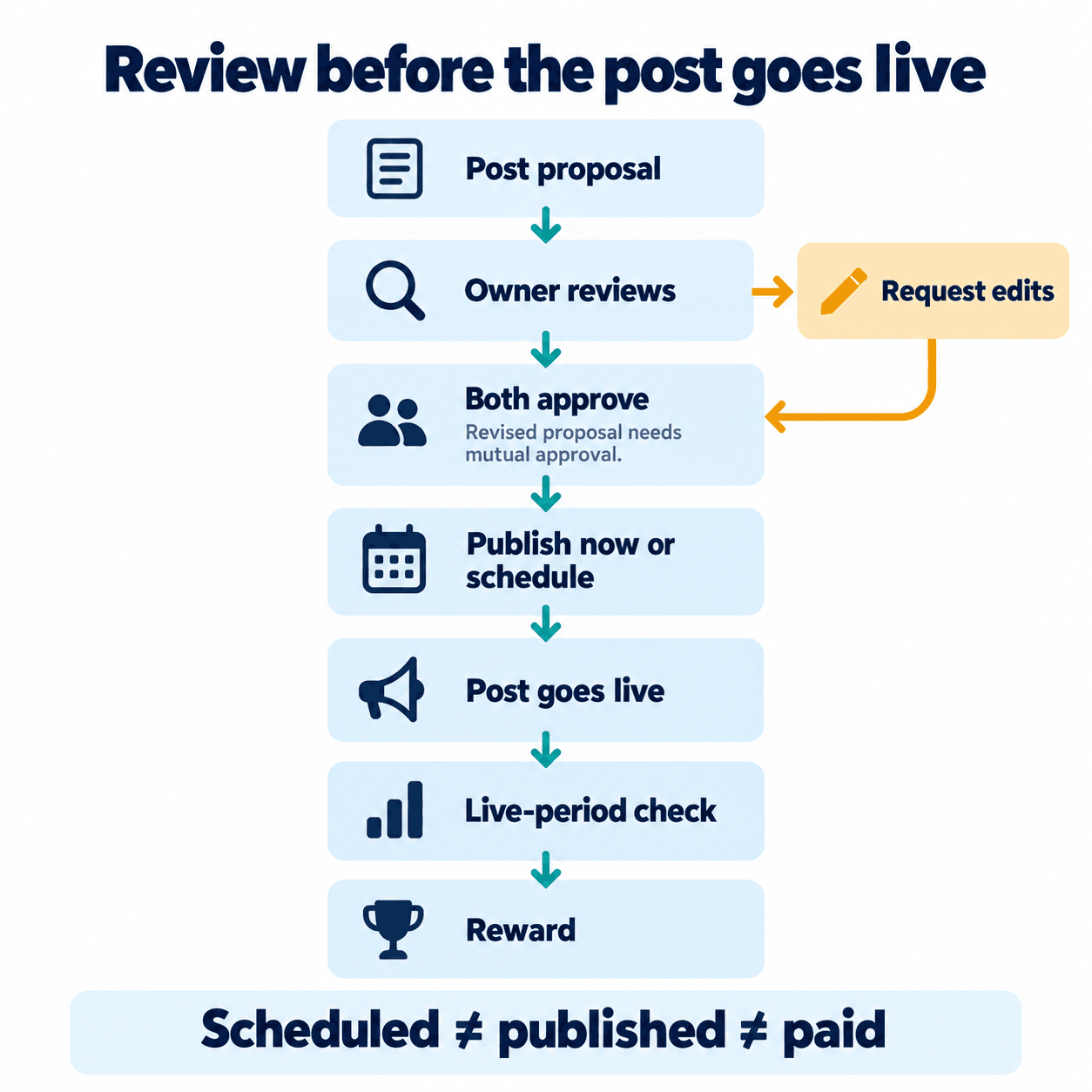
4. Confirm approval of the final version
Telegram’s documented revision flow returns the proposal to the recipient for acceptance, another revision or rejection. If the content, media, price or time changes again, check approval of that latest version. Do not assume an earlier acceptance covers a subsequent counterproposal.
Before committing, compare the accepted message against your editorial calendar and sponsor record. Check who is responsible for approving next. If Telegram reports insufficient Stars, the API documentation says posting or scheduling waits for funding and another approval action. Resolve that state before promising that the placement is queued.
5. Check the queue, then verify the live channel post
Once both parties approve, the post can publish immediately or enter the schedule. Use your scheduled posts workflow to check the intended slot and prevent collisions. At publication time, open the channel itself: confirm that the expected photo, caption and working destination appear, and record the actual posting time and message link.
Use these as your own operational labels; Telegram’s exact interface wording can differ. Keep the evidence with the proposal so a teammate can tell what remains outstanding without reconstructing the conversation.
| Tracking state | Evidence to check |
|---|---|
| Received | Suggested Post in the channel DM |
| Revision | Latest content, price and time sent back |
| Approved | Final version accepted by both parties |
| Scheduled | Queued post and intended publication time |
| Live | Actual channel message and posting time |
| Rewarded | Telegram success or payment record; check later adjustments |
6. Track the live period and Stars payment caveats
As checked on 25 October 2026, Telegram’s official blog describes a reward after 24 hours live and a full return if the post is removed earlier. Count from actual publication, not acceptance or scheduling. The API defines the required live period through a configurable minimum, so verify current terms when accepting future placements.
Keep checking the payment record: Telegram warns that third-party Stars purchases may be refunded within 21 days, potentially deducting Stars from the owner’s balance. Reaching the live-period condition therefore does not justify promising an irreversible payout. Record any refund or adjustment against the placement.
If a separate campaign also involves checking your own authorized phone-number list, PSYKE’s Telegram product offers registered-account and activity checks. That preparation is separate from this native owner workflow. Keep your proposal review, approval and publication records inside Telegram.
Frequently asked questions
Does a scheduled Suggested Post mean the owner has been paid?
No. Verify that the post actually published, then check the reward record after the required live period. A scheduled slot is evidence of a plan, and Stars refunds can still affect the balance.
Can I change the caption or Stars offer before accepting?
Yes. Send a revised Suggested Post and have the recipient accept the final content, price and time. Further revisions require agreement again; a plain conversational acknowledgment should not replace checking the proposal state.