Telethon Database Is Locked: Find the Session Owner Before Restarting
Your Telegram channel worker starts failing with sqlite3.OperationalError: database is locked after you open a diagnostic script. Before restarting the campaign, identify which database the traceback names. An application database and a Telethon session database require different investigations.
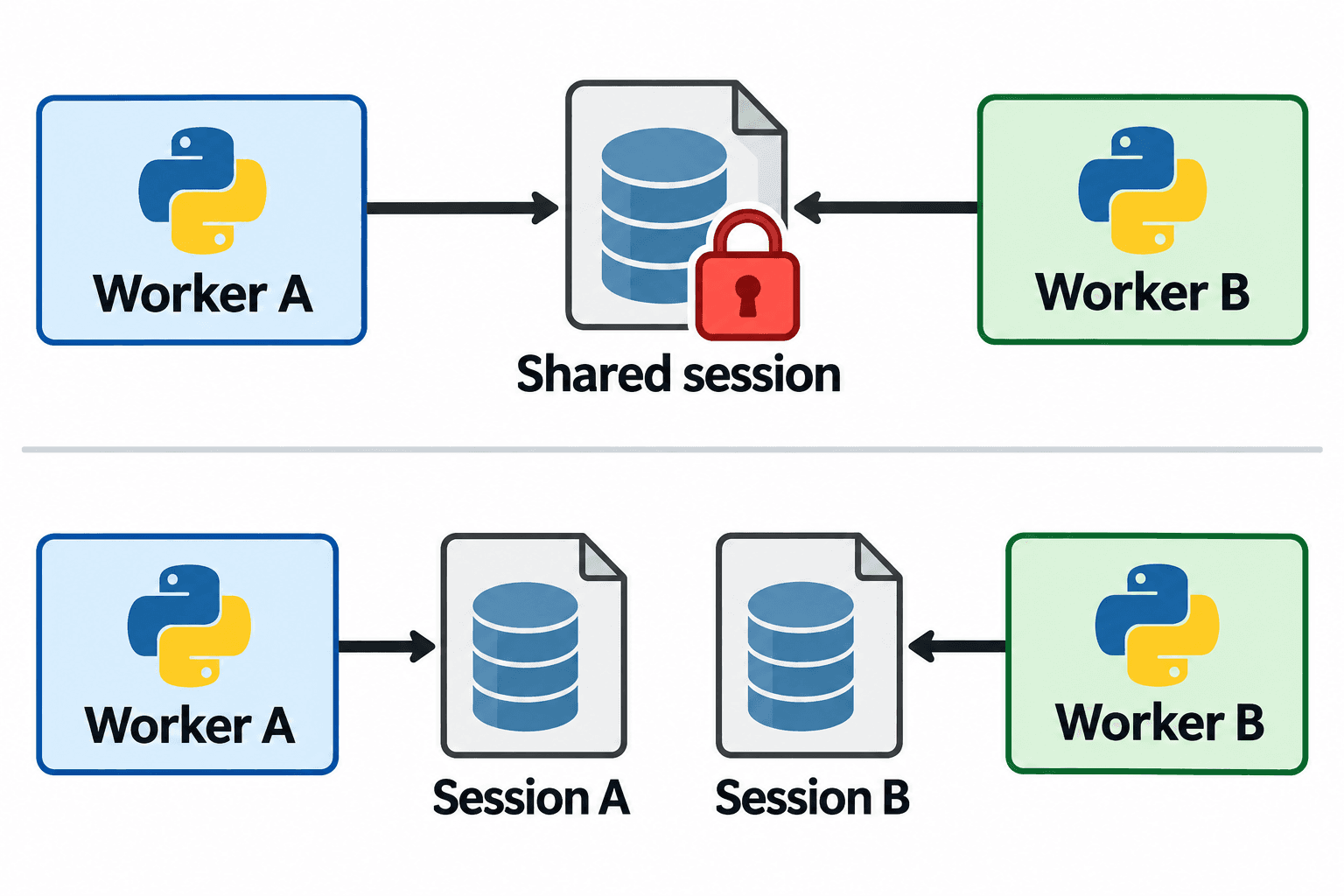
For Telethon’s SQLite session, its official FAQ points to competing clients using one session file. Establish one owner, close duplicate clients cleanly and retest. Do not delete the session as the first response.
1. Confirm the session path and the failing operation
Save a sanitized traceback, the Python and Telethon versions, the deployment command and the working directory. Look for Telethon session code in the traceback. If the failure instead comes from your own queue or customer database, investigate that database separately; the error text alone does not establish a Telethon session conflict.
Resolve the session name to an absolute path before comparing deployments. Two launch commands can look different while pointing at the same mounted file. Conversely, the same relative name under different working directories can identify different files. Record the resolved path privately without uploading the session itself.
Use the minimal example below only after stopping the conflicting deployment and choosing the intended session. It authenticates a Telethon v1 MTProto user client and performs a read of its own account. It does not send a campaign message. The HTTP Bot API does not use this Telethon session file.
2. Give one client a clear lifetime
This example follows the Telethon 1.45.0 documentation checked on 28 October 2026. Its Python syntax was checked with Python 3.14.6; it was not run against Telegram, and Telethon runtime compatibility on that interpreter was not tested. Use your deployment’s supported interpreter and record its exact version when validating. Set your own API credentials through the environment and complete any interactive authentication locally.
import asyncio
import os
from pathlib import Path
from telethon import TelegramClient

async def main():
    session = str(Path("sessions/channel_ops").resolve())
    Path(session).parent.mkdir(parents=True, exist_ok=True)
    client = TelegramClient(
        session,
        int(os.environ["TELEGRAM_API_ID"]),
        os.environ["TELEGRAM_API_HASH"],
    )
    print("Session file:", session + ".session")
    try:
        await client.start()
        me = await client.get_me()
        print("Authenticated:", me is not None)
    finally:
        await client.disconnect()

if __name__ == "__main__":
    asyncio.run(main())
The try/finally block makes disconnect part of normal shutdown. Keep connection and work within one asyncio.run invocation. For a persistent worker, place its actual work inside the try block and let the service’s graceful shutdown reach finally. A force kill cannot execute Python cleanup.
3. Find duplicate owners before restarting
Inspect the expected service, its previous deployment, manual shells, notebooks and scheduled jobs. A development console left open during deployment is easy to miss. On Linux, the official FAQ suggests fuser my.session; substitute the exact absolute session path. On systems with lsof, lsof /absolute/path/channel_ops.session can help identify open handles. These are inspection commands; verify the PID and service before stopping anything.
Check the service manager as well as the process list. Otherwise an automatic restart policy can recreate the duplicate while you are investigating. Stop the confirmed competing service through its normal control mechanism, close the notebook client, and wait for shutdown. Do not terminate every Python process on a shared server.
Hypothetical example: a channel team launches a maintenance console with the production worker’s session name. Both appear healthy initially, then entity-cache writes fail. The correction is to close that console or give its client an independently authenticated session. This is an explanatory scenario, not a measured incident.
| Observation | Next check |
|---|---|
| Lock during overlapping deployments | Old service exit and restart policy |
| Only one process appears | Multiple client objects or notebook kernels |
| Failure continues with one owner | Exact database in traceback and open handles |
| Two services are intentional | Distinct session paths and separate authentication |
4. Separate clients need separate authentication
Telethon issue #637 records a multiworker locking report from 2018. Treat it as historical evidence of the failure pattern, not executable guidance for today’s release. Current v1 guidance recommends separate sessions for separate clients.
For example, choose sessions/channel_ops for the publishing worker and sessions/audit_console for a separate inspection client, then authenticate each through its own login flow. Copying channel_ops.session to a new filename does not create an independently authenticated session. Give every service an explicit session path in its configuration and review shared volumes during deployment.
If several tasks belong to one service, consider routing them through the one owning client instead of constructing a new client per task. This does not remove Telegram permissions or server-enforced waits. Keep session material private because it represents account access.
5. Verify recovery before resuming the workflow
Run the read-only example with the intended single owner. Record whether authentication and get_me complete, then exit normally and confirm the process has stopped. Start it again and check for another lock. For a separate inspection service, repeat using its own independently authenticated session. A successful syntax check alone cannot establish any of these outcomes.
Resume the worker gradually and observe its actual operation and shutdown. If a send was already attempted before the failure, reconcile the recorded outcome before repeating it; clearing a local lock does not prove whether Telegram accepted a previous request. If locking persists, collect a sanitized minimal reproduction with versions and ownership evidence rather than repeatedly restarting or removing files.
Once the client is stable, review the scheduled-post workflow for channel publishing and the bot access guide when designing customer contact flows. PSYKE supports a separate task of checking an authorized phone-number list; it does not repair sessions or send these messages.
If the session starts but a recipient ID still fails, follow the input entity resolution guide to check the current account and cache.
For importing account storage into different tools, see the TData and session format comparison before choosing a file.
Frequently asked questions
Should I delete the Telethon .session file to fix a database lock?
First identify the file and competing owner. Removing the session loses local authentication state and does not correct a deployment that launches duplicate owners. Preserve the file while investigating ownership.
Can two Telethon clients use the same Telegram account?
For separate clients, create and authenticate separate sessions, each with its own path. Do not run them against one shared SQLite session or treat a copied session file as a fresh login.