Why a Telegram access_hash Cannot Be Shared Between Accounts or Logins
Your team’s Telegram channel tool resolves a destination under account A, then passes that input peer to account B. The destination ID looks correct, but the second client fails. The cache design is the first thing to inspect.
Telegram peer access hashes cannot be reused between accounts or between distinct login/auth sessions of the same account. Telegram permits reuse between MTProto sessions attached to the same login authorization. Store a shared target reference separately from each authorization’s resolved peer.
1. Resolve the same test destination inside each client
This minimal example uses the Telethon 1.45.0 stable v1 interface, checked on 28 October 2026. Its syntax was checked with Python 3.14.6; it was not executed against Telegram, and runtime compatibility was not tested. Use a supported interpreter in your own deployment. Set TG_API_ID, TG_API_HASH and TG_TEST_USERNAME locally; the username must identify a public test destination each account may access. Create the sessions directory first and complete each account’s login when prompted.
import asyncio
import os
from telethon import TelegramClient

async def inspect(label, session_path, username):
    async with TelegramClient(
        session_path,
        int(os.environ["TG_API_ID"]),
        os.environ["TG_API_HASH"],
    ) as client:
        peer = await client.get_input_entity(username)
        print(label, "resolved", type(peer).__name__)

async def main():
    target = os.environ["TG_TEST_USERNAME"]
    await inspect("account_a", "sessions/account_a", target)
    await inspect("account_b", "sessions/account_b", target)

asyncio.run(main())
Run this only when these session files have no other owning client. It resolves peers and prints a local label and type, without sending messages or printing hashes. Telethon may update its local cache. The example deliberately keeps each input peer inside its own client block: there is no shared peer object to pass from A to B. Check the actual account behind each session privately before running; the labels do not verify identity.
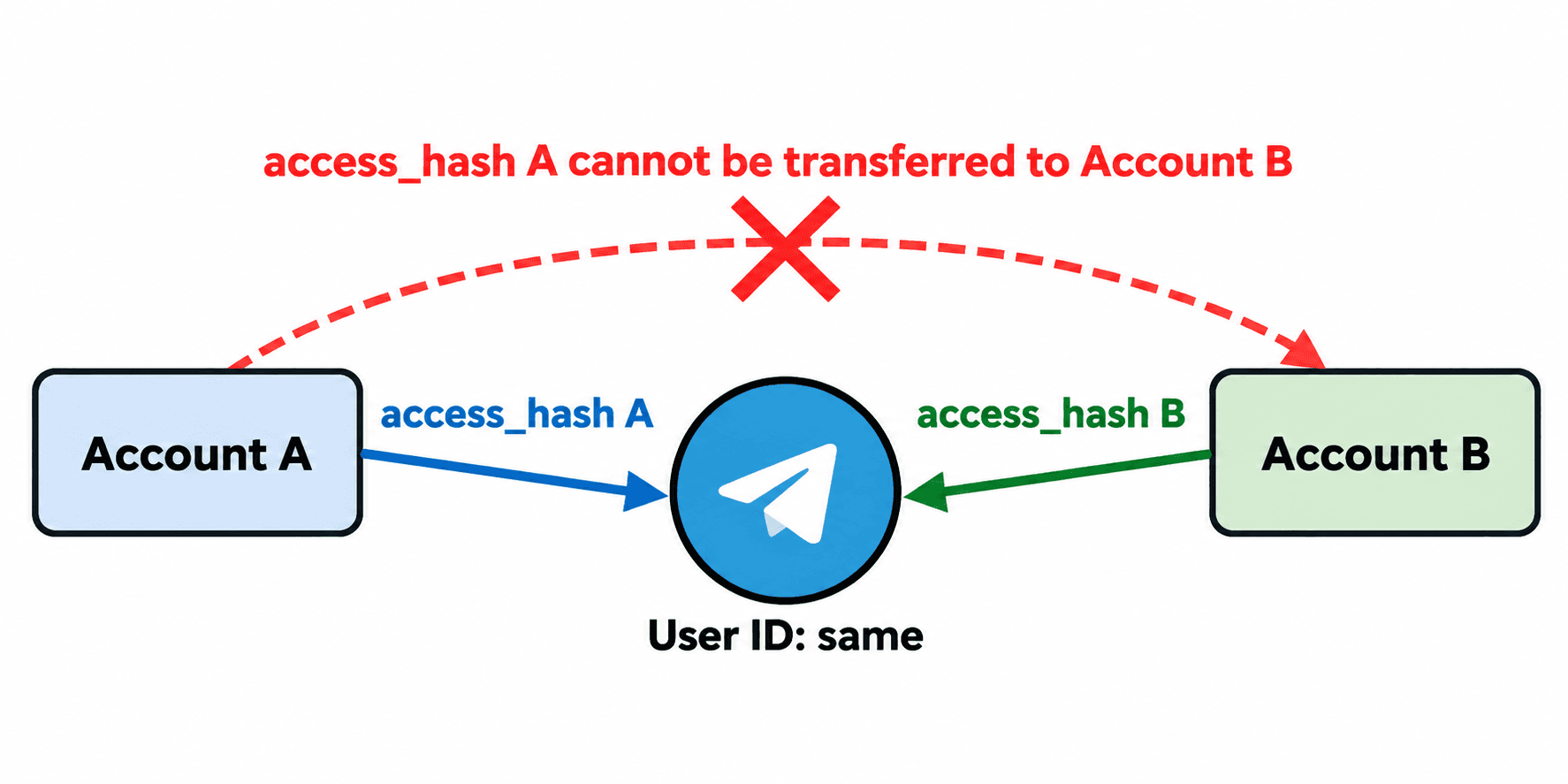
2. Separate four values with different jobs
An API application’s api_id and api_hash identify the developer application used for authorization. They do not calculate a destination’s peer access_hash. A Telethon session file stores authorization material and, by default, encountered entities. Keep that file private.
A peer ID identifies a target, but record its peer type too. Users, basic groups and channels have different input forms; basic groups do not require a peer access hash. A resolved input peer for a user or channel normally includes the hash needed by the request. A matching ID alone does not establish usable access.
| Value | Application responsibility | Do not treat it as |
|---|---|---|
| Peer type + ID | Shared target reference after identity checks | A transferable input peer |
| Peer access_hash | Client-managed, authorization-scoped peer data | A value derived from an ID |
| api_id + api_hash | Application identity and secret api_hash | A peer lookup result |
| Telethon .session | Private authorization and local cache storage | A fresh login just because an existing file is copied |
3. Scope the cache to the login authorization
The word session is overloaded. Telegram’s login/auth session is the authorization boundary in its peer rules. An MTProto session is a protocol session that may belong to that authorization. Telethon’s .session file is client storage. Do not infer a new authorization from a filename, or infer a shared authorization merely because two clients log in to the same account.
For application design, use a private, opaque authorization label that changes after a fresh login. A useful logical cache key is (account_ref, authorization_ref, peer_type, peer_id). This is an implementation recommendation derived from Telegram’s boundary, not an official Telegram database schema. Never use the authorization key itself as a log label.
Let Telethon retain the peer cache inside the session it owns unless you have a concrete need for custom storage. If building shared storage, partition resolved peer records by that logical key. Retire the old partition when replacing an authorization; obtain fresh peer data through the new client. Copying a session file preserves sensitive authorization material and is not independent authentication.
4. Share destinations through a resolver, not a hash export
Hypothetical example: a company has two authorized channel operators. Its destination catalog holds an internal target label, peer type, ID and the last verified public username. Each operator’s worker receives that reference and resolves it through its own client. The username is a lookup route that can change, so compare the resolved destination against the expected ID and type before using it.
For a private destination already visible to that account, use its own existing dialog or incoming event context. If B cannot resolve the destination through its legitimate access, stop B’s job and inspect account access. Do not fill its missing cache entry with A’s exported hash.
A successful lookup does not establish posting, invitation or other operation rights. Verify the intended operation separately in a controlled test destination, honoring permission errors and server waits. This design covers MTProto clients; HTTP Bot API chat_id handling is a different interface. MTProto bot authentication also has different capabilities, so do not apply the user-login example unchanged to a bot.
5. Verify the boundary without exposing private values
Record the deployed Python and Telethon versions, a private account reference, the opaque authorization label and whether target identity verification passed. Keep hashes, session contents, API credentials, phone numbers and message contents out of diagnostic output. Do not compare raw hash values to decide whether reuse is permitted; follow the documented authorization boundary.
Reopen the same authorized session with one owner and repeat the harmless resolution. For a separately authenticated client, repeat resolution there too. Verify the expected destination independently and observe the exact permitted operation before returning a worker to use. These are validation steps for your environment, not live results from this article.
For a concrete lookup failure, follow the input entity resolution guide. For competing processes using one SQLite file, follow the session ownership guide. Those guides address the immediate error; this article addresses how to avoid a shared peer cache crossing account or login boundaries.
PSYKE supports a separate number-check workflow for an authorized phone list. It does not calculate Telegram access hashes, transfer peer access between accounts or repair Telethon sessions.
Frequently asked questions
Can two logins to the same Telegram account share an access_hash?
Telegram disallows reuse across distinct login/auth sessions, even for the same account. Reuse is allowed across MTProto sessions linked to the same login authorization. Have each independently authenticated client resolve its own peer.
Can I calculate access_hash from a Telegram ID or api_hash?
No supported calculation is provided for that workflow. Obtain the peer through the authenticated client’s legitimate resolution context and let its cache retain the result. api_hash belongs to the API application and is not the target’s peer access hash.